Personalize your first slot
Target an audience with a tailored message.
In this tutorial, you will create an experience that shows different content to a specific audience. By the end, you will have a working personalized experience that you can toggle with a query parameter.
Prerequisites
Before you start, make sure you have:
- A Croct account with a workspace and application set up.
- A project with the home-hero slot set up and rendering content. If you have not done this yet, start by creating a slot.
Create an experience
An experience lets you show different content to a specific audience. You will create one that shows a personalized welcome message when a specific query parameter is present in the URL.
Open the experiences page in the admin app.
Click New experience and give it a name, for example Personalized welcome.
In the Audience tab, click New audience. Set the name to Welcome parameter and the criteria to:
property welcome of page's query is "true"This condition matches any user whose URL contains ?welcome=true.
Click the Slot tab and select the home-hero slot.
Click the Content tab and edit the content. For example, change the title to Welcome back! and the subtitle to We have something special for you.
Click Publish to start serving personalized content.
Try it out
Verify that the experience works by toggling the query parameter:
- Open your application
Open your application and load the page as usual. You should see the default content with title Learn more about our platform.
- Add the query parameter
Append ?welcome=true to the URL and reload. You should now see the personalized message with title Welcome back!.
- Remove the query parameter
Remove ?welcome=true from the URL and reload. The default content should be back.
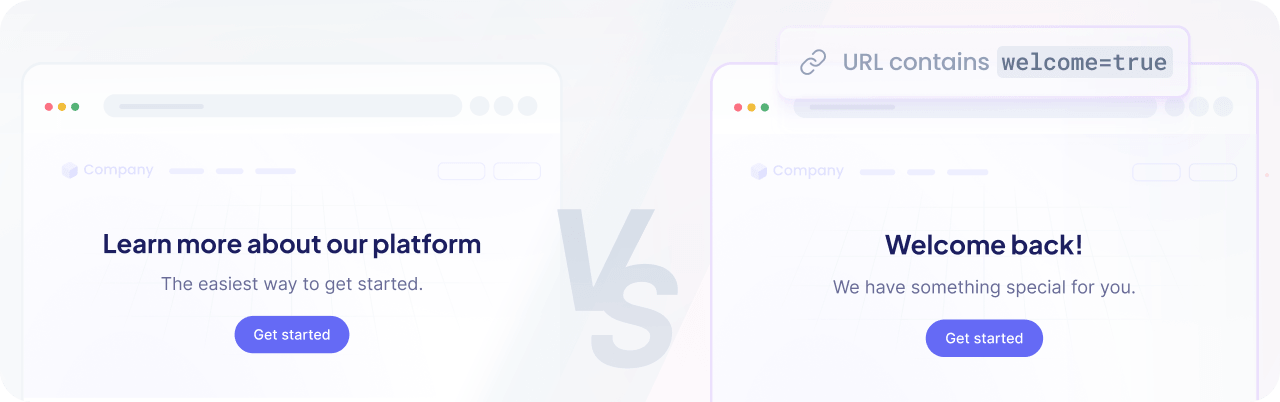

Query parameters are handy for testing during development. In production, you would target real audiences, such as returning users or visitors from a specific location.
Check our playbooks and learn more about the most common use cases.