Identity resolution
Connect separate profiles and keep their data in sync.
This feature is offered as an add-on. Contact sales for more information.
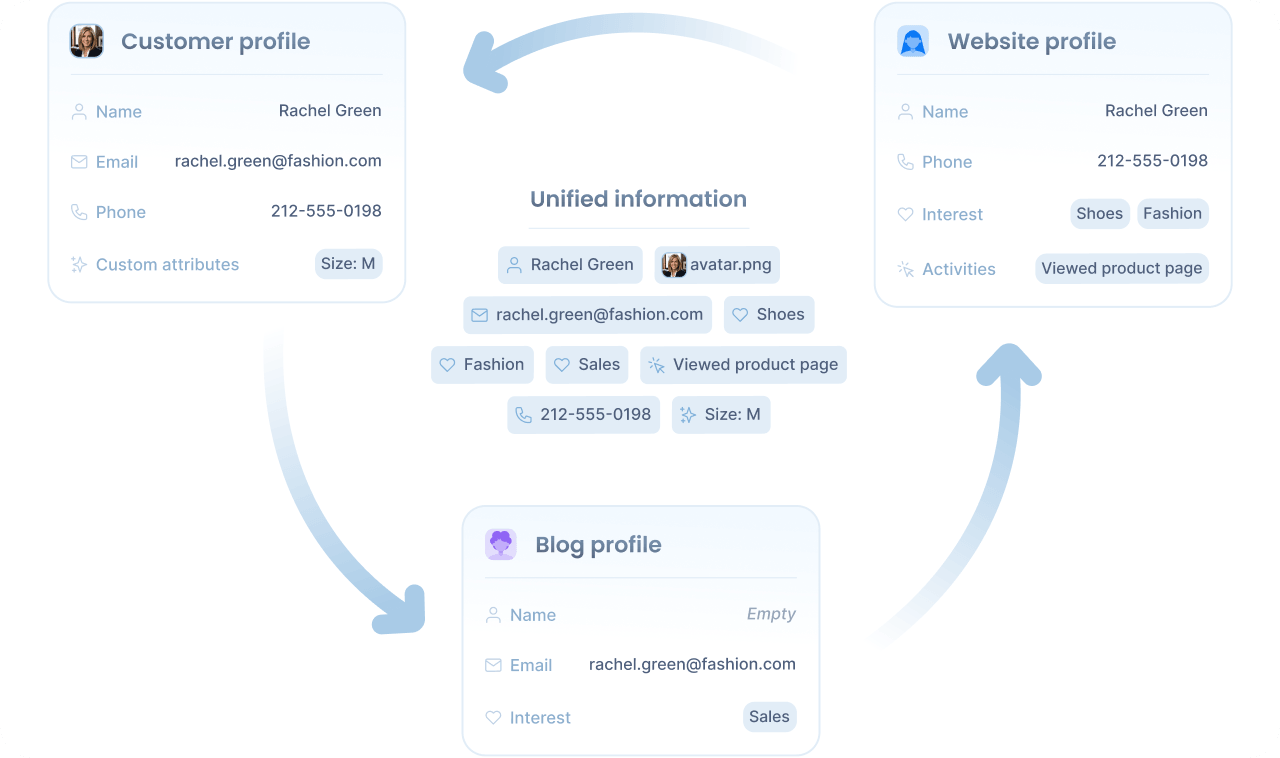
The same person often interacts with your applications under different contexts. They may browse anonymously on a phone, sign in from a personal laptop, and return another day from a work computer. In this example, each context produces a separate anonymous profile, and without a way to connect them, your audiences and experiences end up working with fragmented data.
Identity resolution is the process that connects these profiles and keeps their data in sync automatically. The profiles remain separate, each evolving with its own behavior and history, but their attributes synchronize, so you see a complete view of the visitor without losing the distinct context of each profile.
Scope
Identity resolution operates across an entire organization. Profiles in different workspaces of the same organization share a single matching pool, so the same visitor can be recognized across all of them. Profiles in different organizations remain separate, regardless of configuration.
For privacy, anonymous and identified profiles never associate with each other. Anonymous profiles only sync with other anonymous profiles, and identified profiles only with other identified ones, so personal data captured on identified profiles never flows into anonymous ones.
Cross-workspace syncing differs by profile type:
- Anonymous profiles are connected automatically across workspaces when each application’s anonymity scope is set to organization level. At a tighter scope, anonymous profiles stay isolated per workspace.
- Identified profiles are not connected automatically across workspaces, even when they share the same external user ID. To connect them, you should define matching rules over the standard contact attributes such as email or phone, or over the external user ID itself.
The synchronization boundary follows your account structure: workspaces under one organization can be unified through identity resolution, while different organizations stay isolated. See organizational models for guidance on choosing the structure that matches the level of profile sharing you want.
Matching rules
Identity resolution finds matches by applying matching rules you define. A matching rule is a set of identity attributes that must all be equal for two profiles to be considered the same visitor.
Some attributes uniquely identify a visitor on their own. An email address, for example, is rarely shared, so two profiles with the same email address almost certainly describe the same visitor. Other attributes are weaker. A first name like “Rachel” is common to many people, and a phone number can be shared across a family or business. Matching on a weak attribute alone risks syncing unrelated profiles.
A single rule can combine multiple attributes to make the match stronger. Each attribute alone may be inconclusive, but together they provide enough evidence to declare a match with confidence. For example, first and last name alone could match many visitors, but combined with a phone number, they almost certainly identify the same visitor.
You can define multiple rules, and profiles sync as soon as any rule matches. This lets you mix simple rules, like matching by email, with combinations for cases where no single attribute is reliable.
For example, your workspace might use the following rules:
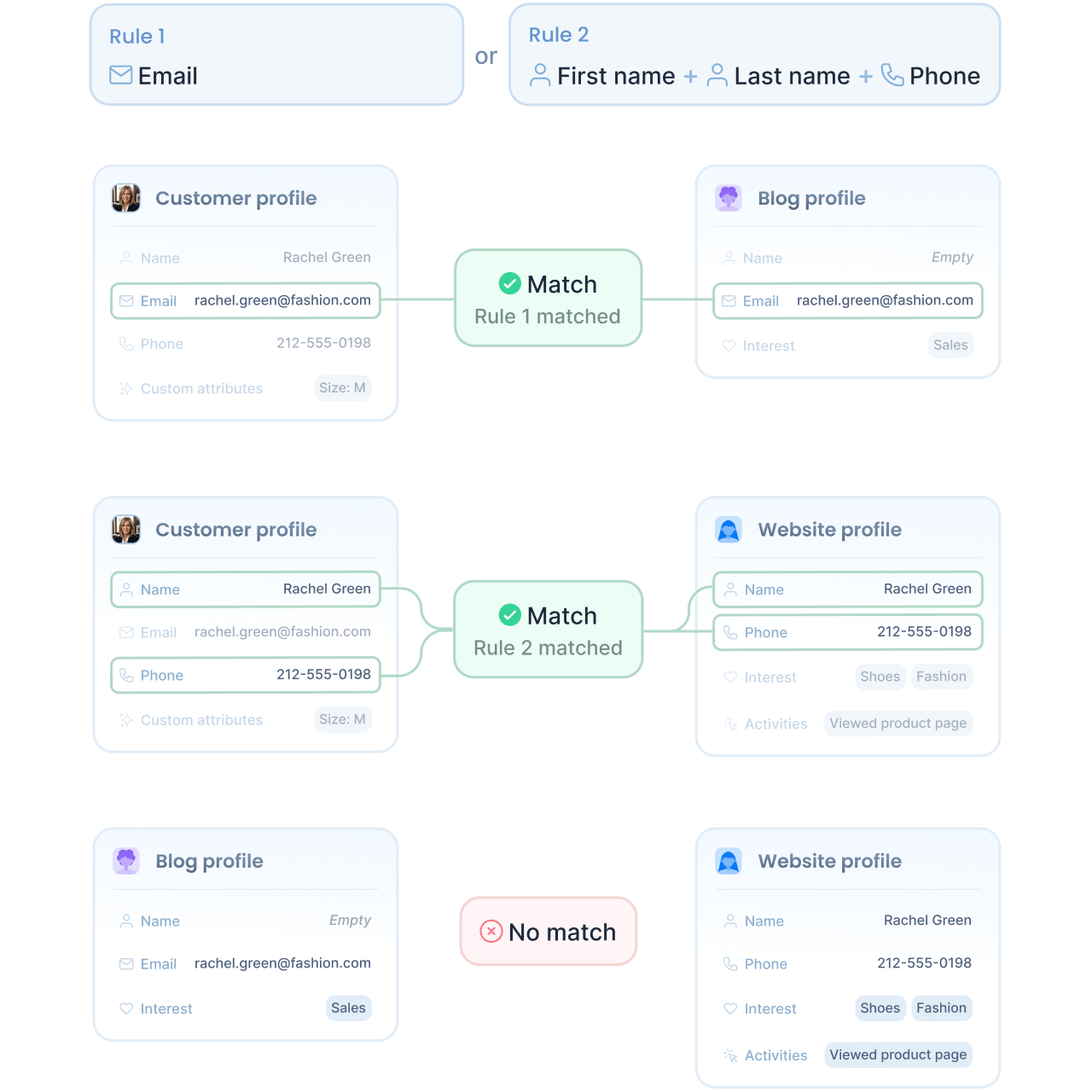
- Rule 1: match by email alone. An email address is unique enough to identify a visitor on its own.
- Rule 2: match by phone, first name, and last name together. None of these is reliable alone, but the combination is.
Under these rules, two profiles sync if they share an email address, or if they share a phone number along with the same first and last name.
Equivalent attributes
You can mark identity attributes as equivalent to have them treated interchangeably during matching. A value stored in one of the equivalent attributes matches the same value stored in any of the others, so a rule on one field automatically extends to the rest.
By default, email and alternate email are equivalent, as are phone and alternate phone. If rachel.green@fashion.com is stored as the email on one profile and as the alternate email on another, a rule on email still matches and syncs them as the same visitor.
Match propagation
Each match triggers a new search using the matched profile’s attributes, repeating the process for up to five rounds. This allows profiles to associate through chains of shared attributes, even when no single profile contains every identifying field.
Suppose Rachel interacts with your applications across three contexts, each producing a separate profile:
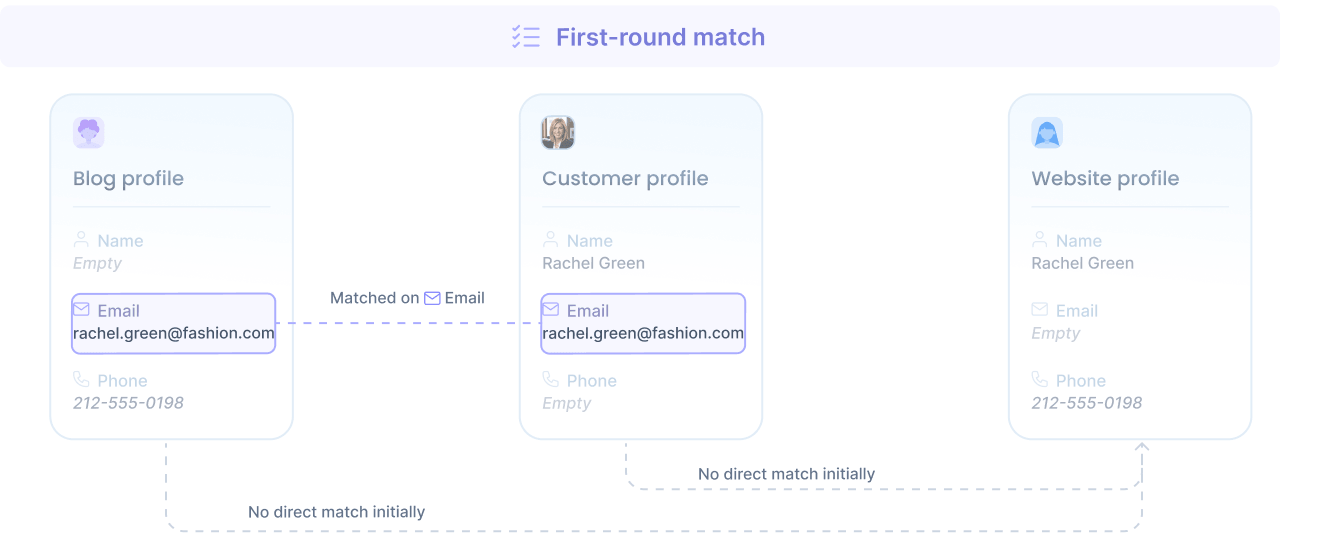
- The blog profile, from a newsletter signup on your blog, holds her email (rachel.green@fashion.com) and phone number (212-555-0198), but no name.
- The customer profile, from a signed-in session in the dedicated customer area, holds her name (Rachel Green) and the same email, but no phone.
- The website profile, from a callback request on your website, holds her name and the same phone number, but no email.
No single attribute connects the blog and website profiles directly. Yet propagation associates all three across two rounds of matching and syncing.
- First-round match
The blog and app profiles share the same email, so they match.
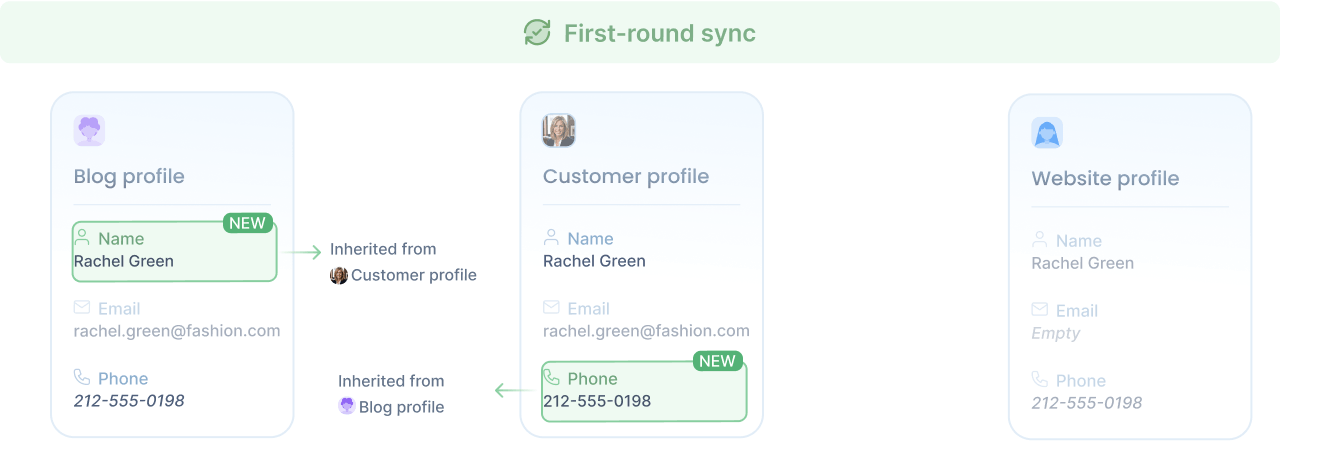
- First-round sync
With the two profiles associated, attributes flow between them: the blog profile inherits the name from the app profile, and the app profile inherits the phone from the blog profile. Both now hold the full set of name, email, and phone.
- Second-round match
Carrying the newly inherited attributes, the blog and app profiles now satisfy the rule on phone plus first and last name with the website profile, so the website profile is matched too.
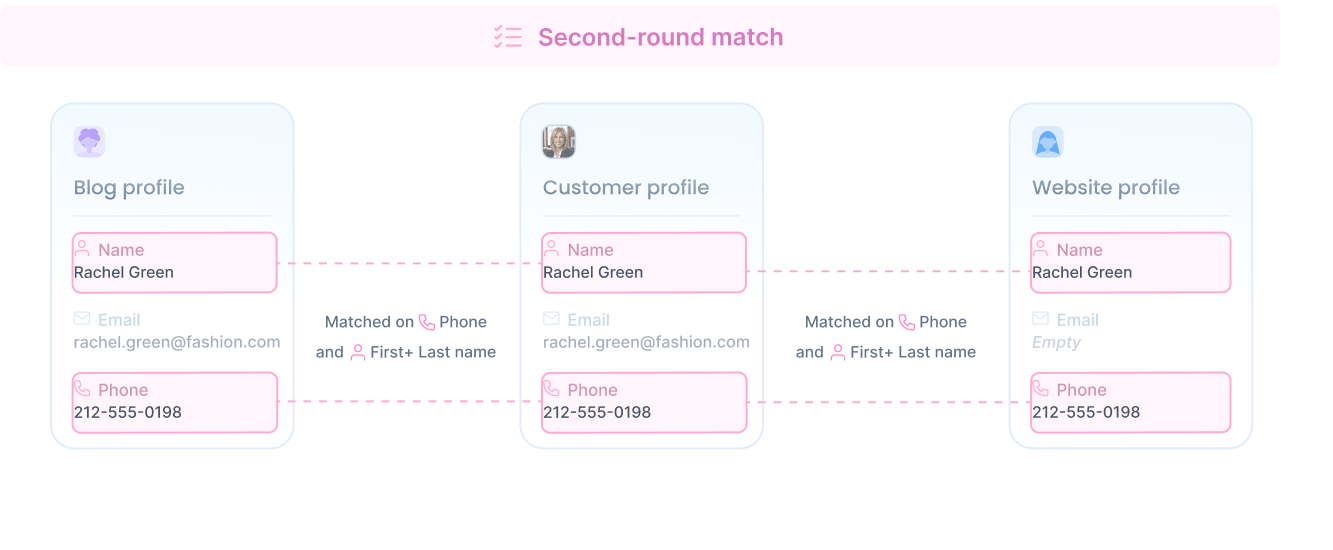
- Second-round sync
The website profile inherits the email from the blog and app profiles. All three now share the same name, email, and phone.
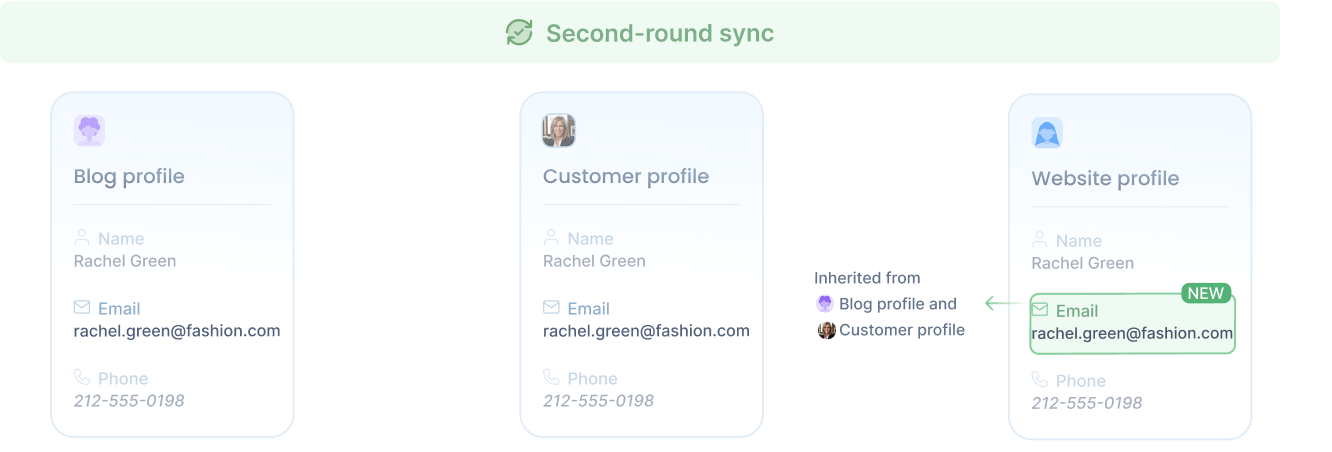
All three profiles are now associated as the same person, even though the blog and website profiles initially had no attribute in common. A third round finds nothing new, and propagation stops.
Propagation stops after at most five rounds, keeping resolution fast and predictable for any single update. Most identity chains resolve in fewer rounds, so this limit rarely has any practical effect.
Shared attributes
Matching and sharing are two distinct decisions. Matching rules decide which profiles describe the same visitor, but the data that flows between associated profiles is configured separately.
Each workspace controls its own data sync, deciding which attributes it accepts from associated profiles. This lets different teams, products, or business units apply their own privacy and data-handling rules, so the same visitor can hold different attribute sets in each workspace depending on what each one chooses to accept.
For example, a workspace can choose to take only contact details like name, email, and phone from associated profiles, while data like interests, activities, or custom attributes stays scoped to the profile that captured it.
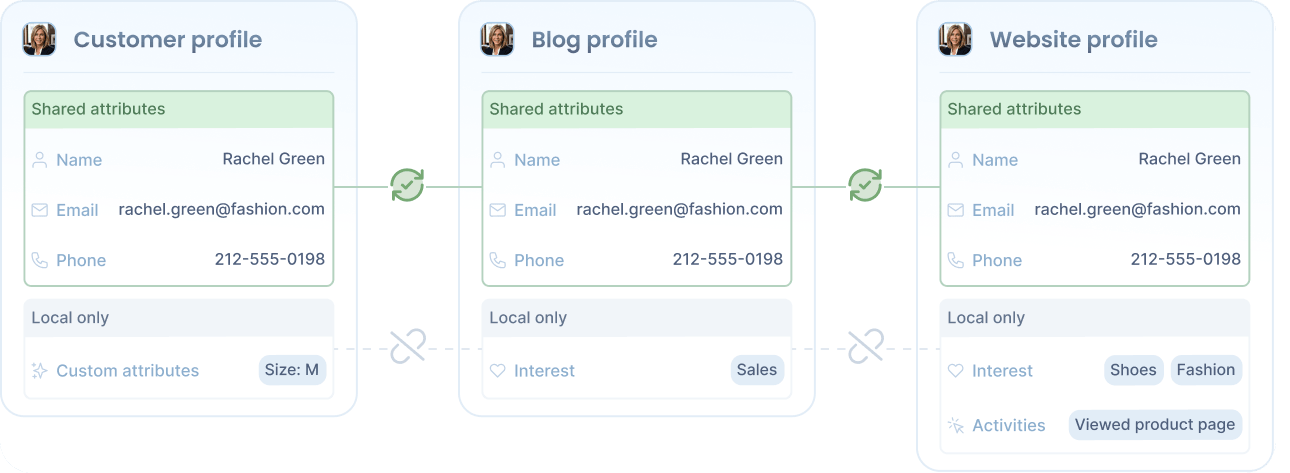
By default, every profile attribute is shared, including any custom attributes defined for the workspace, so identity resolution gives you a unified view out of the box. See the user reference for the full list.
Conflict resolution
When two associated profiles have different values for the same attribute, identity resolution needs to decide which one is current. Rather than picking one profile as the source of truth, it decides each attribute independently. Every value has its own update timestamp, and the most recent one wins. The latest first name, the latest email, and the latest phone can each come from a different profile.
For example, suppose Rachel’s blog, app, and website profiles are associated. The app profile has the most recent name update, with her middle name added (Rachel Karen Green, 25 minutes ago). The blog profile has the most recent email update, where an alternate email was added (rach_g@gmail.com, 1 minute ago). The website profile has the most recent phone update, switching to the international format (+1 212-555-0198, 2 days ago). After the merge, every profile reflects the latest value of each attribute: the name from app, the alternate email from blog, and the international phone from website.
Set attributes such as interests and activities are combined and deduplicated rather than replaced, so values collected by any profile are preserved across the merge.
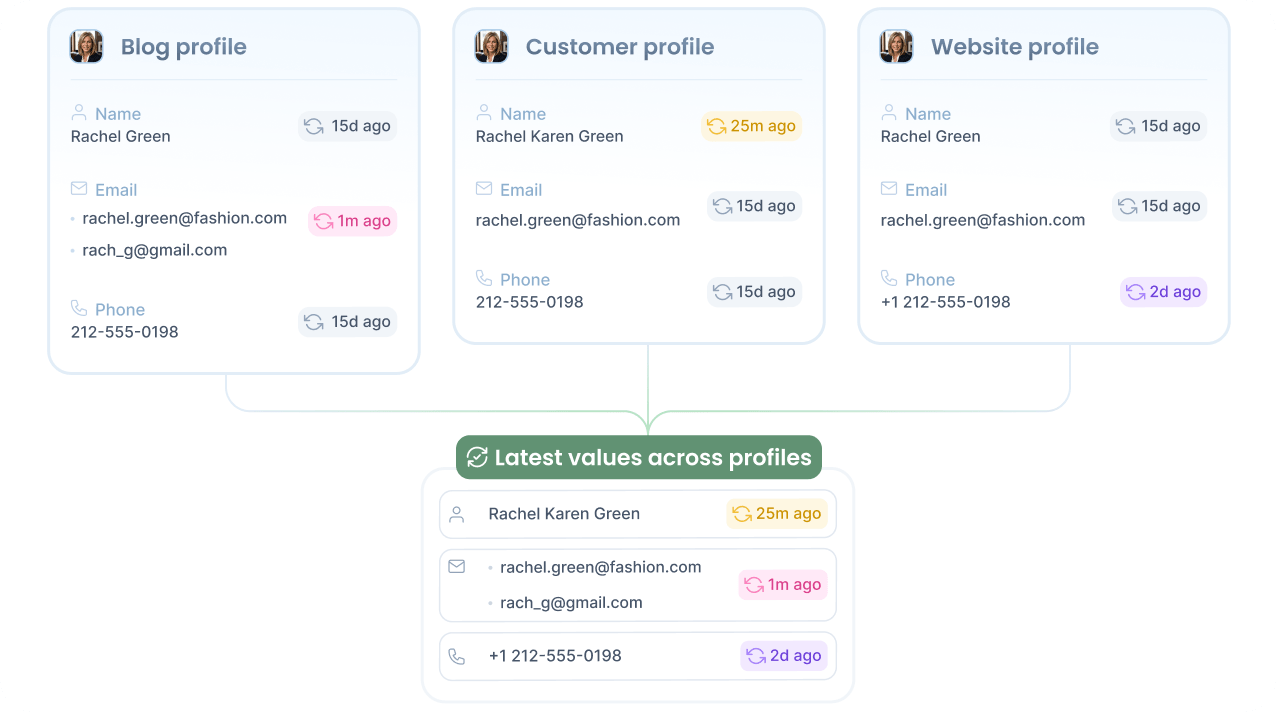
Syncing is not a one-time operation. As long as the profiles stay associated, any future update to one of them is propagated to the others, so audience evaluations against any of them rely on the most recent and unified data.
Matches are recomputed on every profile update, so changing rules stops future syncs between profiles that no longer match. However, data already synced between profiles stays in place. Prefer conservative matching rules when identifying data is low quality.
Configuration
When identity resolution is enabled on your workspace, you can configure:
- Matching rules: the attribute combinations that sync two profiles as the same visitor. A rule can be a single attribute or a combination that must all match, such as phone plus first and last name. Profiles sync when any rule is satisfied.
- Equivalent attributes: groups of attributes treated as interchangeable during matching. By default, email and alternate email form one group, and phone and alternate phone form another.
- Shared attributes: which attributes the workspace accepts from associated profiles. Each standard attribute and your custom attributes can be toggled independently, with all attributes accepted by default.
Contact sales to get started.