Rich text schema
Learn how to define schemas for formatted text.
Rich text schemas describe formatted text, such as headlines with emphasis or descriptions with links.
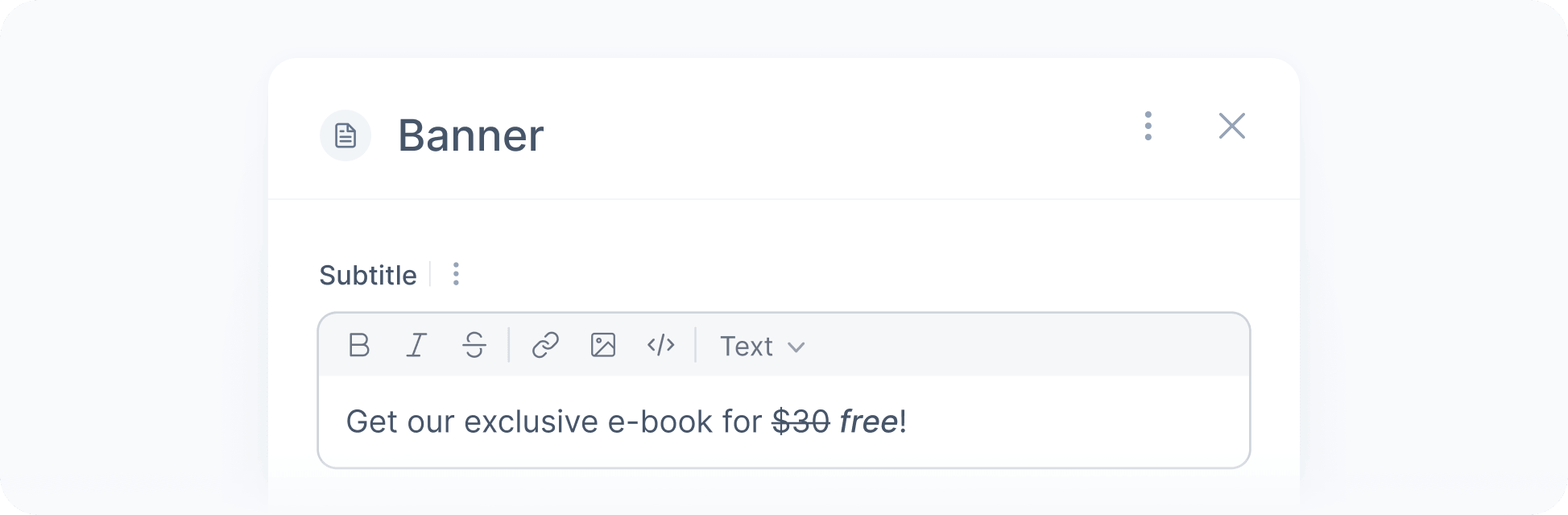
In the user interface, a rich text schema appears as a text editor with a toolbar for applying the allowed formatting. The resulting value is a Markdown string, such as Get **50% off** on [all products](https://example.com).

Check our guide to learn general best practices and considerations when working with Markdown content.
Examples
Below are some examples of rich text schemas:
{ "type": "reference", "id": "@croct/richText", "properties": {}}Unlike other schemas, the rich text schema is not a separate type. Instead, it is an extension of the text schema that interprets the text as formatted content. That is why you reference it using the @croct/richText identifier instead of defining it directly.
Properties
These are the properties available for rich text schemas:
- minimumLength(optional)number
The minimum length of the text, including formatting characters.
- maximumLength(optional)number
The maximum length of the text, including formatting characters.
Maximum lengthThe maximum length is limited to 300 characters for single-line text and 1000 characters for multi-line text.
Default:maximum allowed- format(optional)string
The text format. The only supported value is multiline, which allows the text to span multiple lines.
If not specified, the text is limited to a single line.
- allowedFormatting(optional)Array<string>
The formatting options available in the editor, with at least one option.
For example, if you only want to allow bold, italic, and links, you can set this property to ["bold", "italic", "link"].
Below are the formatting options we currently support:
Formatting Markdown syntax bold **bold** italic *italic* strikethrough ~~strikethrough~~ inline-code `code` link [text](url) image  heading # Heading quote > Quote unordered-list - Item ordered-list 1. Item code-block Lines between ``` fences Default:any formatting from the table below