Run a redirect experiment
Split traffic between two pages and compare the results.
A redirect experiment sends part of your traffic to a different URL. Everyone arrives at the same page, and a share of the visitors is immediately forwarded to a different one, usually a redesigned version of that page or an entirely new conversion flow.
Because most testing tools work this way, redirect experiments are usually the first format teams are exposed to. One thing worth keeping in mind is that the redirected group experiences two page loads before seeing any content, so it is a good idea to weigh that tradeoff before choosing this approach.
In this tutorial, you will decide whether a redirect experiment is the right tool for the change you want to test, and then run one from the first component to a published experiment.
Choose the right approach
Before implementing a redirect, you need to be sure the change actually calls for a second URL. There are three ways to compare two versions of a page, and they differ in where the split happens and what it costs the visitor:
| Approach | Where the split happens | User experience |
|---|---|---|
| Content experiment | On the server, while the page renders | Seamless, one page load |
| CTA experiment | On click, in the destination of the link | Seamless, one page load |
| Redirect experiment | On arrival, before or right after the load | Extra wait, two page loads |
Content experiment
Everyone stays on the same URL, and the parts that differ come from a slot: a headline, a CTA label, an image, a whole section, or the layout itself. Because we resolve content on the server, the assigned variant is already in the first HTML response, so the visitor gets a single page load with no redirect.
CTA experiment
The versions live on different URLs, but the split happens when the visitor clicks, not when they arrive. The slot holds the destination of the link, so each variant sends the visitor to a different page and nobody is redirected.
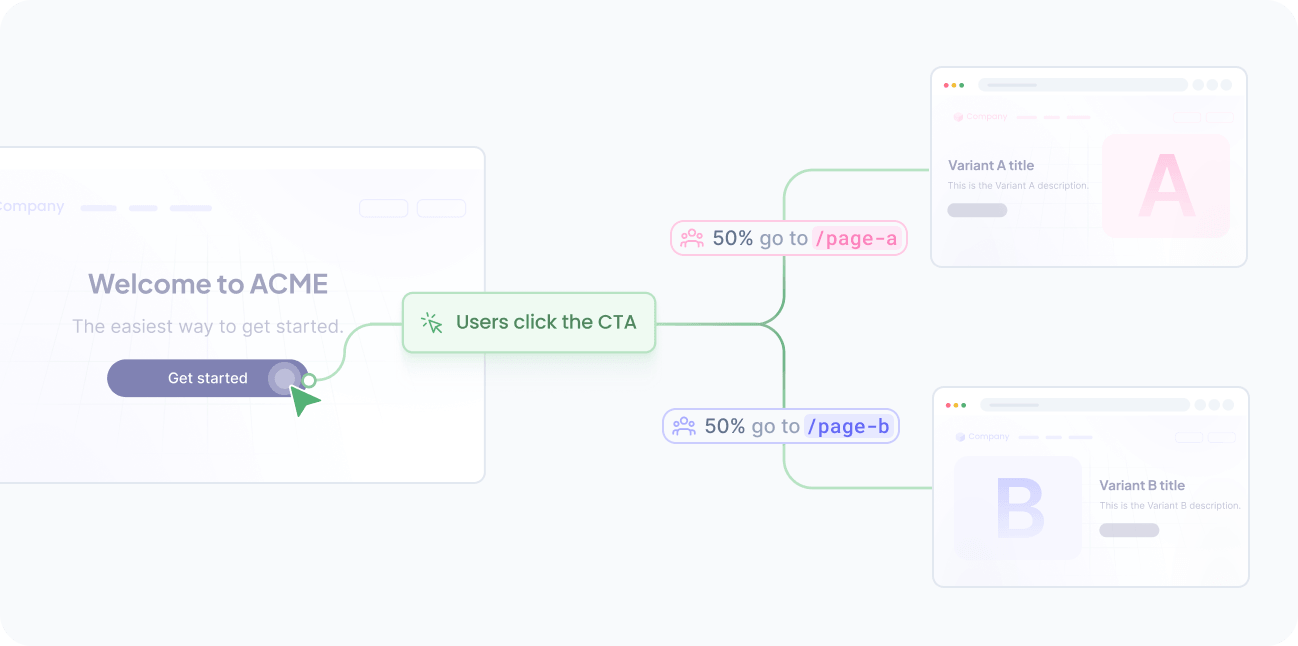
Redirect experiment
The entry point itself is the page under test, and the variant lives at another URL. The redirected group pays for two page loads, so reach for it when the two versions are genuinely separate pages, such as a page rebuilt from scratch, a different template, or a landing page produced by another tool.
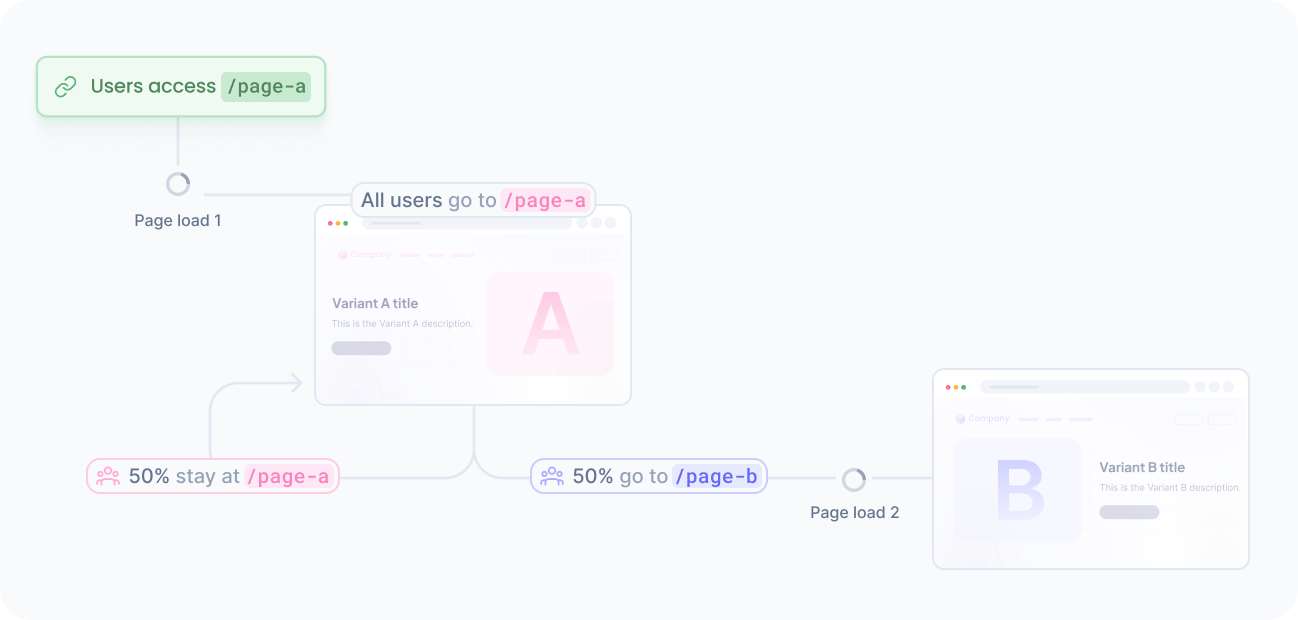

If the two versions differ only in what the page says or shows, model the difference as content and keep a single URL. You learn the same thing without a second page load, and the results are not skewed by the visitors who leave while the redirect happens.
How it works
Every request follows the same path:
The visitor requests the page, and your application resolves the redirect slot along with the rest of the content.
We evaluate the audience, allocate the visitor to a variant, and return the URL configured for that variant, or nothing for the group that stays.
Your application redirects when the slot has a URL, and renders the page as usual when it does not.
We track the exposure, with no extra call on your side.
When the visitor converts, your application tracks a goal event on whichever page the conversion happens.
The slot is the only moving part. Your code asks for a URL and acts on it, so adding a variant, changing a destination, or ending the experiment never requires a deployment.
Choose where the redirect happens
The redirect can run on the server or in the browser, and the choice decides what the visitor sees while the assignment is resolved:
| Aspect | Server-side redirect | Client-side redirect |
|---|---|---|
| Decision point | Before any HTML is sent | After the page loads and the content arrives |
| What the visitor sees | Only the final page | A hidden page until the decision arrives |
| Flicker risk | None | Real, if the mask fails or a script is blocked |
| Crawlers and bots | Follow a standard HTTP redirect | Never run the experiment |
| Requirement | A server or edge runtime per request | Only the browser SDK |
Redirect on the server whenever your stack renders per request. It costs the visitor nothing beyond the redirect itself, and the original page is never rendered for the group that leaves it.
Redirect in the browser only when there is no server to decide, such as a fully static site served from a CDN, or a page you cannot change on the server. To avoid showing the old page before the new one, you have to hide the page until the answer arrives, which delays the first paint for everyone, including the visitors who stay.
Set up the experiment
Running a redirect experiment follows the same flow as any other AB test, with a slot that carries a URL instead of visible content.
Create the slot
The slot is what your code reads on every request, and the component defines what it can hold:
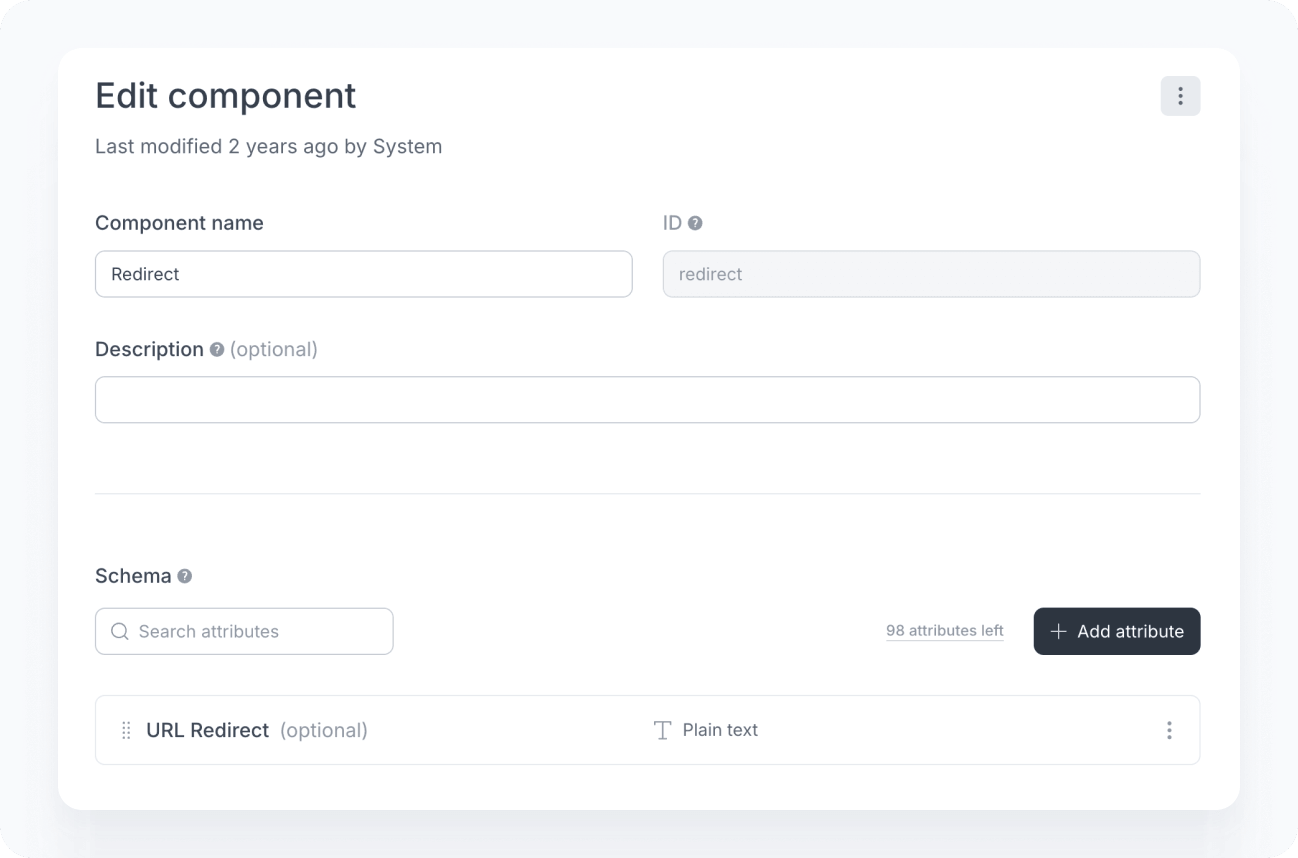
Open the components page and create a component with the ID redirect and the following attribute:
Attribute Type Required redirectUrl Plain text No Keep the attribute optional. An absent value is what tells your application that the visitor stays where they are.
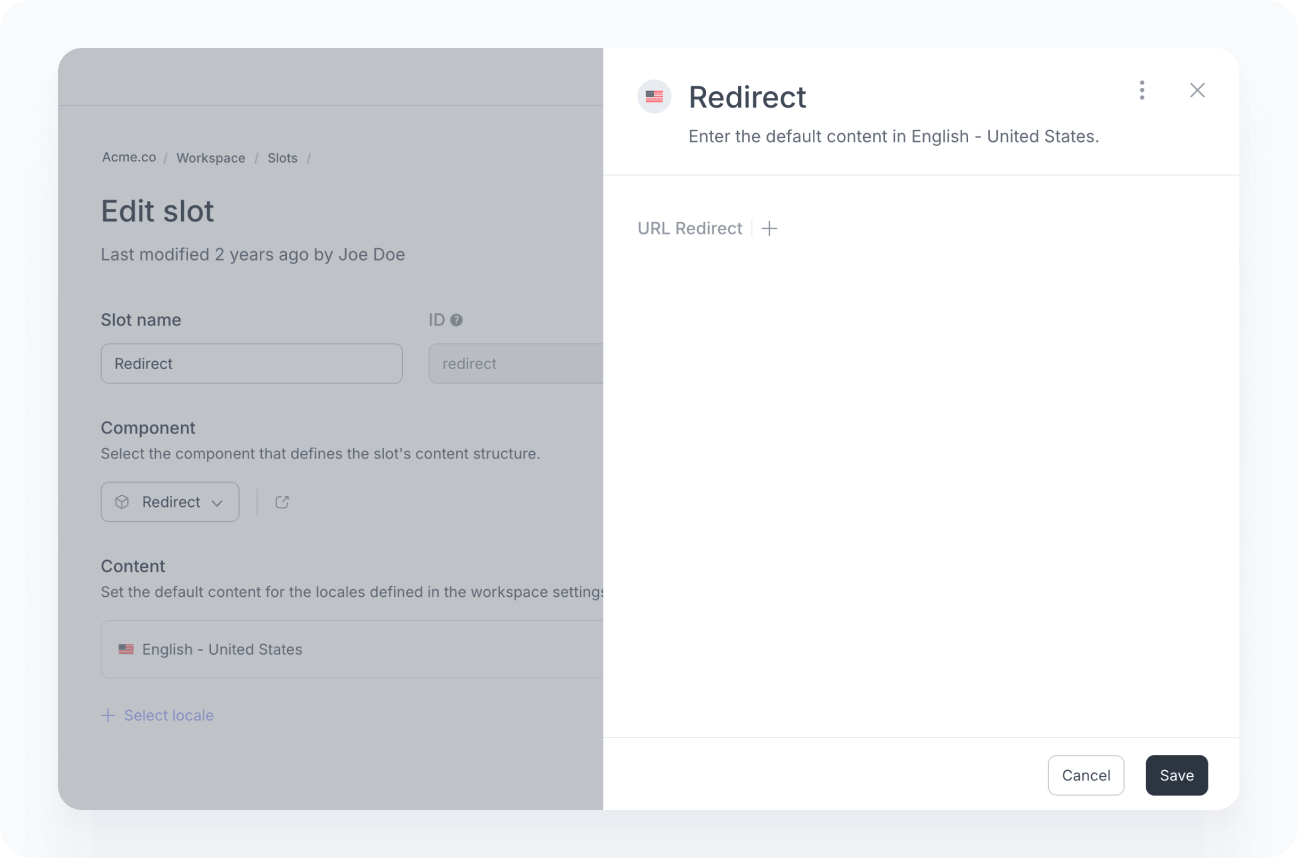
Open the slots page and create a slot with the ID redirect, associated with the redirect component.
Leave the default content empty. An empty URL means no redirect, so the page keeps behaving exactly as it does today until you publish the experiment, and it goes back to that the moment you stop it.
Add the slot to your project:
npmnpx croct@latest add slot redirectThe CLI generates the type definitions and downloads the default content for use as an automatic fallback, so a failed request leaves the visitor on the current page instead of blocking the experiment.
Redirect on the server
Resolve the slot where your application handles the request, and redirect when the slot carries a URL:
import {redirect} from 'next/navigation';import {fetchContent} from '@croct/plug-next/server';import {HomeHero} from '@/components/HomeHero';
export default async function HomePage() {  const {content} = await fetchContent('redirect');
  if (content.redirectUrl) {    redirect(content.redirectUrl);  }
  return <HomeHero />;}
Because the decision happens before any HTML is sent, the visitor never sees the page they are about to leave, and crawlers follow an ordinary HTTP redirect.
Use a temporary status, such as 302 or 307, not a permanent one. A permanent redirect is cached by browsers and search engines, so visitors would keep landing on the variant long after the experiment ends.
Redirect in the browser

Hiding the page delays the first paint for all visitors, including the ones who stay. Reach for this approach only where there is no server to decide, and keep the mask on the page under test.
When no server is involved, the page has to hide itself until the content arrives, otherwise the visitor sees the current page and then jumps to another one.
Hide the page until the answer arrives, and reveal it as soon as it does, whatever the answer is:
import croct from '@croct/plug';
croct.plug({appId: 'APPLICATION_ID'});
croct.fetch('redirect')    .then(({content}) => {        if (content.redirectUrl) {            location.replace(new URL(content.redirectUrl, location.href));        }    })    .finally(() => document.body.classList.remove('croct-pending'));
Three details make this safe. The page is revealed in every outcome, including errors, so in the rare event of a failed request the visitor still sees the original page. The SDK aborts the request after its default timeout, so the page cannot stay hidden indefinitely. Calling replace instead of assigning the location keeps the original page out of the history, so the back button takes the visitor to where they came from instead of triggering the redirect again.
Configure the experiment
The experiment lives in the platform, not in your code:
Open the experiences page and create an experience targeting the audience you want to test, then open the Slot tab and select the redirect slot.
Open the Experiment tab, name it, and select the goal that represents the conversion you want to compare.
Allocate the traffic that enters the experiment.
Create two variants, such as “Current page” and “New page”, and split the traffic evenly between them.
Open the Content tab and set the URL for each variant. Leave it empty for “Current page”, and set the address of the new page for “New page”.
Click Publish and launch the experience.
Only the variant that moves the visitor carries a URL. Visitors outside the audience get the empty default content and stay where they are, while visitors who are eligible but not allocated get the experience’s content, so leave that one empty as well unless you want them redirected too. For a niche audience, allocate 100% of the traffic so the experiment collects enough data to reach statistical validity.
Track the conversion
The goal you select in the experiment must match a GoalCompleted event tracked in your application. Without it, the experiment collects exposures but no conversions.
Track it on both destinations, since the conversion can happen on either page. The goal decides the winner, and tracking the event that matches the conversion adds revenue, lead, and sign-up figures to the same comparison:
import croct from '@croct/plug';
document.querySelector('#signup').addEventListener('click', () => {  croct.track('goalCompleted', {    goalId: 'sign-up',  });});
See Track events for the full list of events and what each one adds to the analysis.
The visitor is recognized per domain, so a redirect to a different domain starts a new anonymous visitor whose conversion is never attributed to the variant. For a destination on a subdomain, share the session first, as described in Identify users across subdomains.
If your application authenticates users, the assignment follows the identified visitor across devices instead of being tied to a single browser. See Experiment with feature flags for how identity feeds the assignment.
Review and publish
Before you let the experiment run, confirm that both paths behave as expected:
- Preview each variant
Use preview mode to check that the variant with a URL redirects and the one without it renders the page untouched.
- Follow the redirect once
Land on the destination page and reload it. If you end up somewhere else, the destination is resolving the slot too, and the loop needs to be broken before publishing.
- Check the exposure count
In the experiment dashboard, confirm that the split between variants matches your configuration. A persistent imbalance means visitors are dropping out during the redirect, and no other metric is worth reading until that is resolved.
- Confirm that goals are firing
Complete the conversion on both pages and check that the event appears with the correct goal.
Analyze the results
Once the data starts coming in, compare the variants in the experiment dashboard and read the performance per goal widget to see which page converts better.
If you redirect in the browser, read the numbers with the cost of the mask in mind. The redirected group waits for the decision and then loads a second page, so part of any difference reflects the wait rather than the page itself. A new page that wins despite that handicap is a strong result, and one that loses narrowly deserves a second look at how much of the gap the delay explains. A server-side redirect costs the visitor a single round trip, so it does not skew the comparison this way.
When you have a winner, apply it for good. Point the original URL at the winning page, or move its content into the page you already serve, and stop the experiment. The slot goes back to its empty default, so no visitor is redirected while you clean up.