Forward GTM events to Croct
Automatically track events from the data layer.
This integration connects Google Tag Manager to Croct. Once set up, it automatically tracks the events your site already pushes to the GTM data layer, so you can build audiences, run AB tests, and personalize the experience with no extra development work.
How it works
The integration hooks into the browser’s window.dataLayer, the global queue Google Tag Manager and GA4 push every event to.
Conversions
For every supported data layer event listed below, it records a Goal completed. The goal ID is the data layer event name prefixed with data-layer-, with underscores replaced by hyphens, so purchase becomes data-layer-purchase and view_item becomes data-layer-view-item.
These goals power Experiences and Experiments, letting you target and measure each one directly when building audiences and analyzing dashboards.
Event mapping
The integration supports the recommended data layer events listed below.
When an event maps to a dedicated Croct event, the integration also tracks it to capture the interaction’s details. The remaining events are tracked as conversions only.
| Data layer event | Croct event |
|---|---|
| view_item | productViewed |
| view_cart | cartViewed |
| begin_checkout | checkoutStarted |
| purchase | orderPlaced |
| search | eventOccurred |
| add_to_wishlist | eventOccurred |
| login | - |
| sign_up | - |
| add_payment_info | - |
| add_shipping_info | - |
| close_convert_lead | - |
| generate_lead | - |
| qualify_lead | - |
| working_lead | - |
Cart and order events require a currency. When the data layer event does not include one, the integration falls back to GA4’s default, USD.
The eventOccurred events carry a few relevant details from the source event:
| Data layer event | Tracked details |
|---|---|
| search | searchTerm |
| add_to_wishlist | id, name, category, brand, variant |
Prerequisites
Before you start, make sure you have:
- A Croct account with a workspace and application set up.
- The Croct SDK installed in your project.
- A Google Tag Manager container installed on your site.
- Events pushed to the data layer.
Send data from data layer to Croct
You can add the integration in one of two ways:
- Add a script tag directly to your website’s source code.
- Use Google Tag Manager to inject the script without changing the source code.
Add a script tag
Add the following script to your website’s HTML, either in the <head> or the <body>:
<script src="https://cdn.croct.io/plug-integration/google-tag-manager.js"></script>The integration replays events already in the data layer, so it captures them even if it loads after GTM or GA4. Loading it early only ensures the earliest events are tracked in real time.
Use Google Tag Manager
If you prefer not to edit your source code, you can use Google Tag Manager (GTM) to capture every event in the data layer.
In Google Tag Manager, select Tags > New.
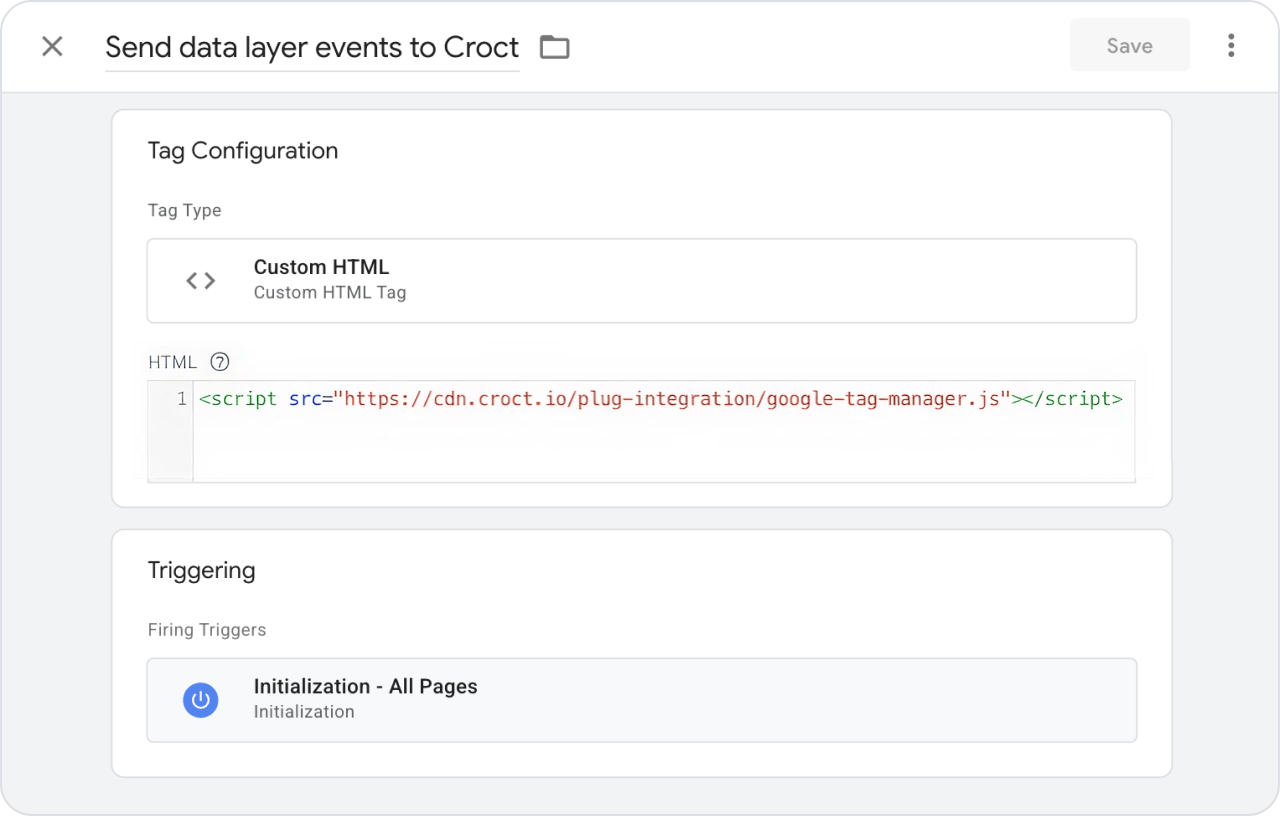
Name the tag as Send data layer events to Croct.
Set the tag type to Custom HTML.
Copy and paste the following code into the HTML field:
Custom HTML tag<script src="https://cdn.croct.io/plug-integration/google-tag-manager.js"></script>Select the trigger Initialization - All Pages, so the events are captured as early as possible on every page.
Click Save, then Submit to publish your container.
When the trigger fires, the script starts reading the events from the data layer and tracking them to Croct.
Your tag should look like this:
Verify the integration
Once the script is live, confirm that events appear on your dashboards.
- Browse your site
Open your site and trigger a few events, such as viewing a product, searching, or starting a checkout.
- Check the events
Open the dashboard page in the admin app and confirm that conversions are arriving.
With your events flowing into Croct, you can now create audiences from behavior and optimize the user experience.