Sessions
Understand how events are grouped into visits.
A session is a group of related events that represent one visit or period of activity in your application.
Sessions help us understand behavior across time: when a user visited, what happened during that visit, how long the visit lasted, and whether later activity should be treated as a continuation or a new visit.
You can see sessions in user profiles, where they help organize a user’s activity into meaningful visits. The timeline shows them in chronological order, along with the events that happened in each one.
Event grouping
Online activity does not have a reliable “user left” signal. A visitor can pause, switch tabs, close a browser, return later, cross midnight, or keep using an app while offline.
Consider this sequence:
- At 10:00, a visitor opens a product page.
- At 10:07, they close the tab without buying.
- At 10:30, they come back and add the product to the cart.
- At 10:35, they place an order.
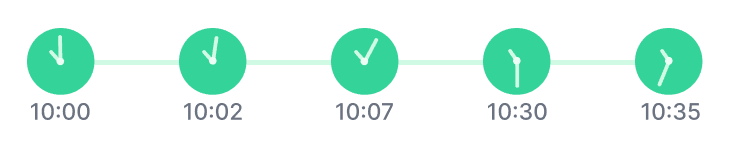
Whether this is one session or two depends on the rule your application uses. For some businesses, the return at 10:30 is still part of the same visit. For others, it should start a new one.
For each event, we decide whether it extends an existing session or starts a new one.
When an event arrives, we look for a session that is still valid for that event. If we find one, the event is added to that session. Otherwise, a new session starts.
Not every event has the same effect. On the web, most meaningful browsing and commerce events can start and extend sessions. Passive or no-op events do not necessarily do so, which helps prevent artificial sessions from being created without real user activity.
Session states
A session moves through three states:
-
Active
The session is open and can be extended by new qualifying events. -
Closed
The session is no longer active, but it can still accept late events during the grace period. -
Expired
The session can no longer receive events.
The expiration time is the close time plus the grace period. Once the grace period ends, the session expires and late events can no longer be attached to it.
We also cap how long a session can remain reopenable to 48 hours from its latest event.
Expiration policies
Applications currently support the following expiration policies.
Timeout policy
With the timeout policy, a session stays active until the configured inactivity timeout passes after the most recent event. Every qualifying event pushes the session forward.
If the gap between one event and the next is longer than the configured timeout, the next event starts a new session. This is the default policy and the model used by most analytics tools.
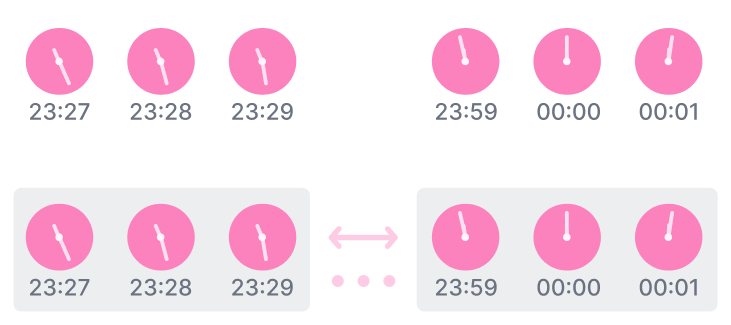
In the example above, the events at 23:27, 23:28, and 23:29 are grouped into one session. The next event happens at 23:59, after a 30-minute gap, so it starts a new session with the events at 00:00 and 00:01.
New applications use the timeout policy with a 30-minute inactivity timeout. We currently support inactivity timeouts from 1 minute to 24 hours.
Use this policy when you want sessions to reflect natural visits based on gaps in activity.
Midnight policy
With the midnight policy, sessions are grouped by calendar day instead of inactivity. A session stays valid only inside the current day in the configured time zone.
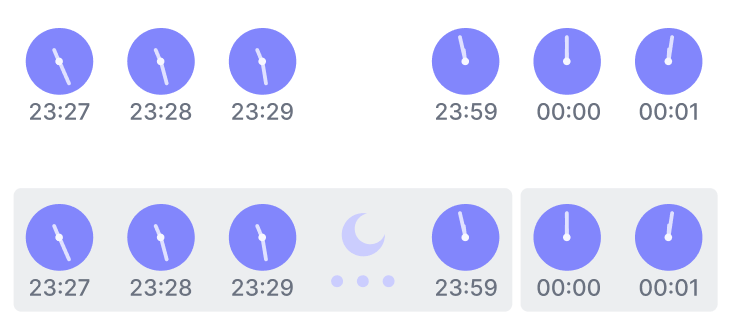
In the example above, the events from 23:27 to 23:59 are grouped into one session. The events at 00:00 and 00:01 start a new session because they happened on the next day.
Use this policy when sessions should align with calendar-day reporting or operational routines.
Late events and grace period
Late events are events that happened earlier but arrived later. This can happen when the client was offline, buffered events locally, or sent events out of order.
The grace period defines how long a closed session can still accept late events. During that period, the session is no longer active, but delayed events can still be attached to it as long as their timestamps fit the session window.
For example, if a user goes offline during a visit and the app sends the buffered events later, the grace period helps keep those events in the session where they happened.
New applications use a 24-hour grace period. You can set it anywhere from zero to 24 hours.
The longer the grace period, the more time the platform has to recover delayed or out-of-order events.